Barcode Manager
All your product barcodes in one place, from GTIN to print file
Bring the spreadsheet you already have. Barcode Manager checks every number, gives each new product the next GTIN from your GS1 prefix, and makes the EAN-13, UPC or ITF-14 file your printer asked for. Free for up to 10 items.
What is Barcode Manager?
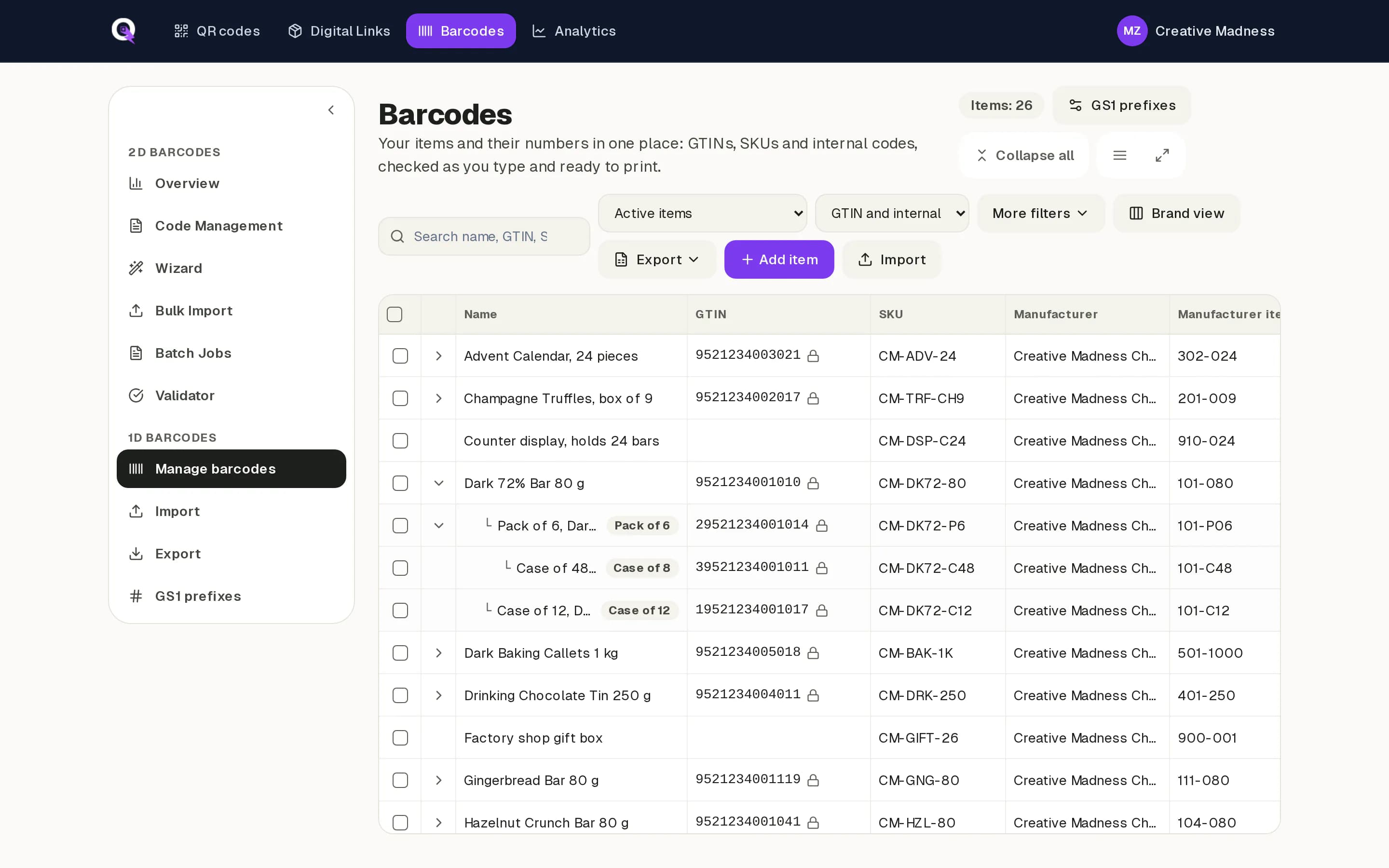
Barcode Manager is barcode management software in QRbolt. It keeps your GTINs, SKUs and internal codes in one checked list, assigns new GTINs from your GS1 Company Prefix, and makes print-ready 1D barcode files: EAN-13, UPC-A, UPC-E, EAN-8, ITF-14, GS1-128, Code 128 and Code 39.
Each item is the same product record QRbolt uses for GS1 Digital Link. When you add a 2D code to a product later, it carries the same GTIN as the barcode already on the pack. No renumbering, and no second list to keep in step.
Sound familiar?
- Your barcodes live in an Excel file that one person really understands.
- Someone picks the next GTIN by hand and works out the check digit on a website.
- The packaging designer gets a PNG by email, at the wrong size, without the digits underneath.
- Nobody is sure which number the case uses, or how many numbers are left in your prefix.
- One typo in a GTIN, and a print run of labels goes in the bin.
- And now your retailer is talking about 2D barcodes.
Barcode Manager replaces the spreadsheet, the check digit website and the email chain with one list that checks every number as you go.
Who it is for
Any business that prints 1D barcodes and has outgrown the spreadsheet.
Small consumer-goods brands
Distributors
Private-label businesses
What Barcode Manager does
Start from your spreadsheet
Paste rows from Excel or Google Sheets, or upload an .xlsx or .csv file. Every row is checked before anything is saved: wrong check digits, duplicates, numbers outside your declared prefix, and numbers from GS1 ranges that are not meant for products. A wrong check digit comes with the corrected number, and you decide whether to use it. Values that are not GTINs can stay as internal codes. Files of up to 50,000 rows import in the background.
Assign GTINs from your GS1 Company Prefix
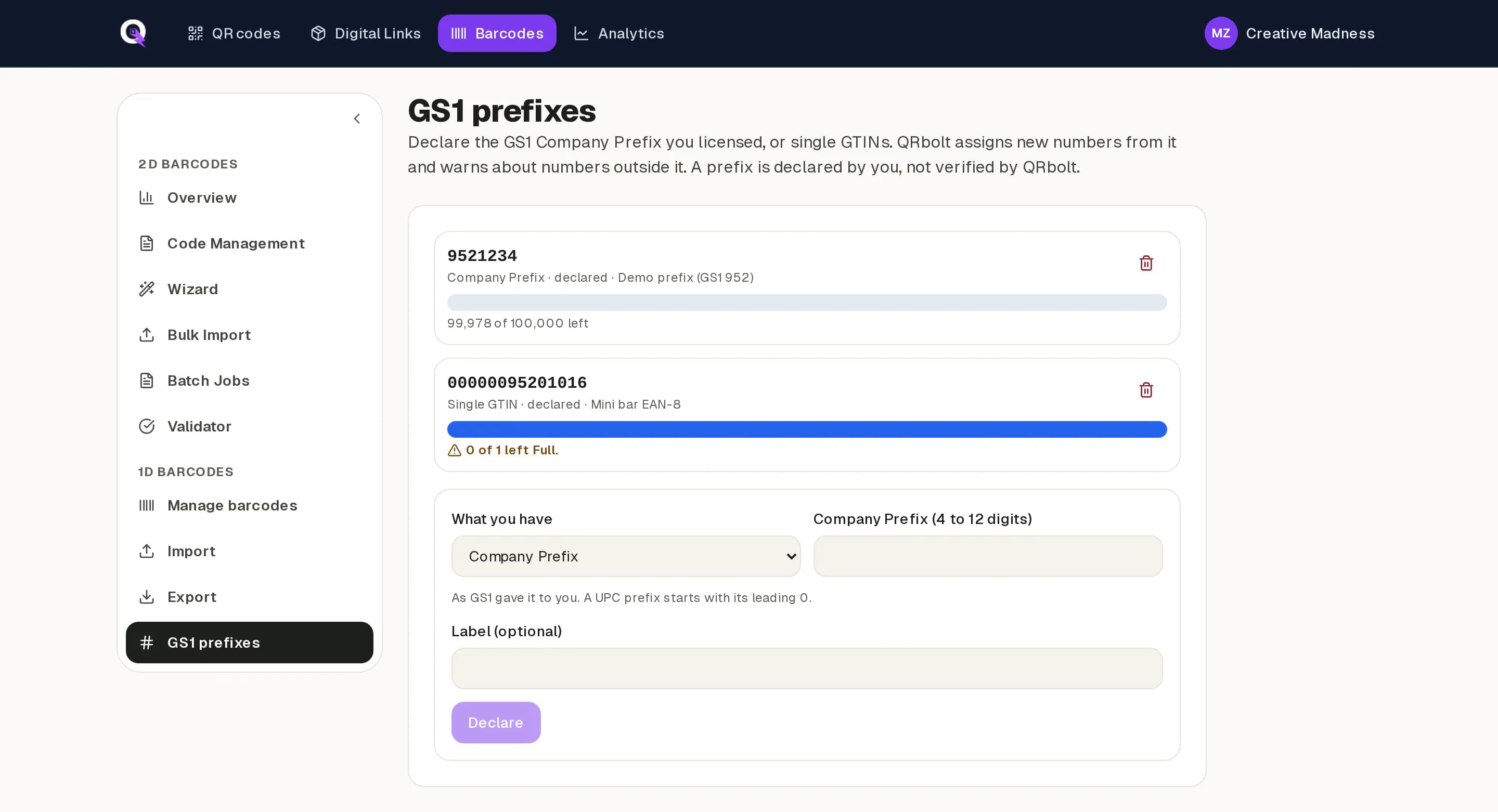
Declare the GS1 Company Prefix you licensed, or the single GTINs you bought. Choose Assign GTIN and QRbolt takes the lowest free number in your prefix, adds the check digit and shows how many numbers you have left. Nobody picks a number by hand, and two products never end up with the same one.
Unit, pack and case
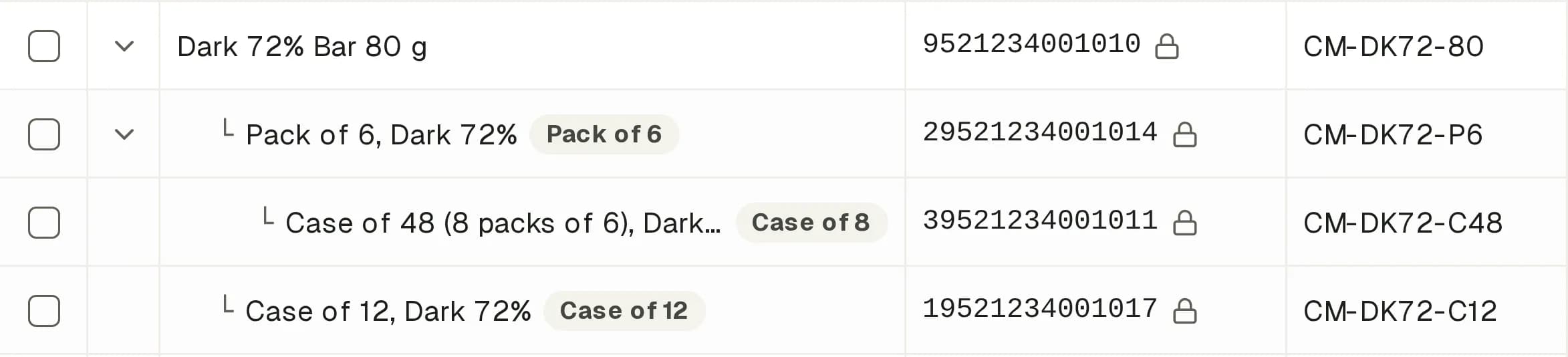
Add a pack or a case to a product and QRbolt proposes its GTIN-14: an indicator digit in front of the unit's number and a recalculated check digit. That is the number in the ITF-14 barcode on the carton. Packs and cases stay linked to their product instead of becoming stray rows.
Print-ready barcode files at GS1 sizes
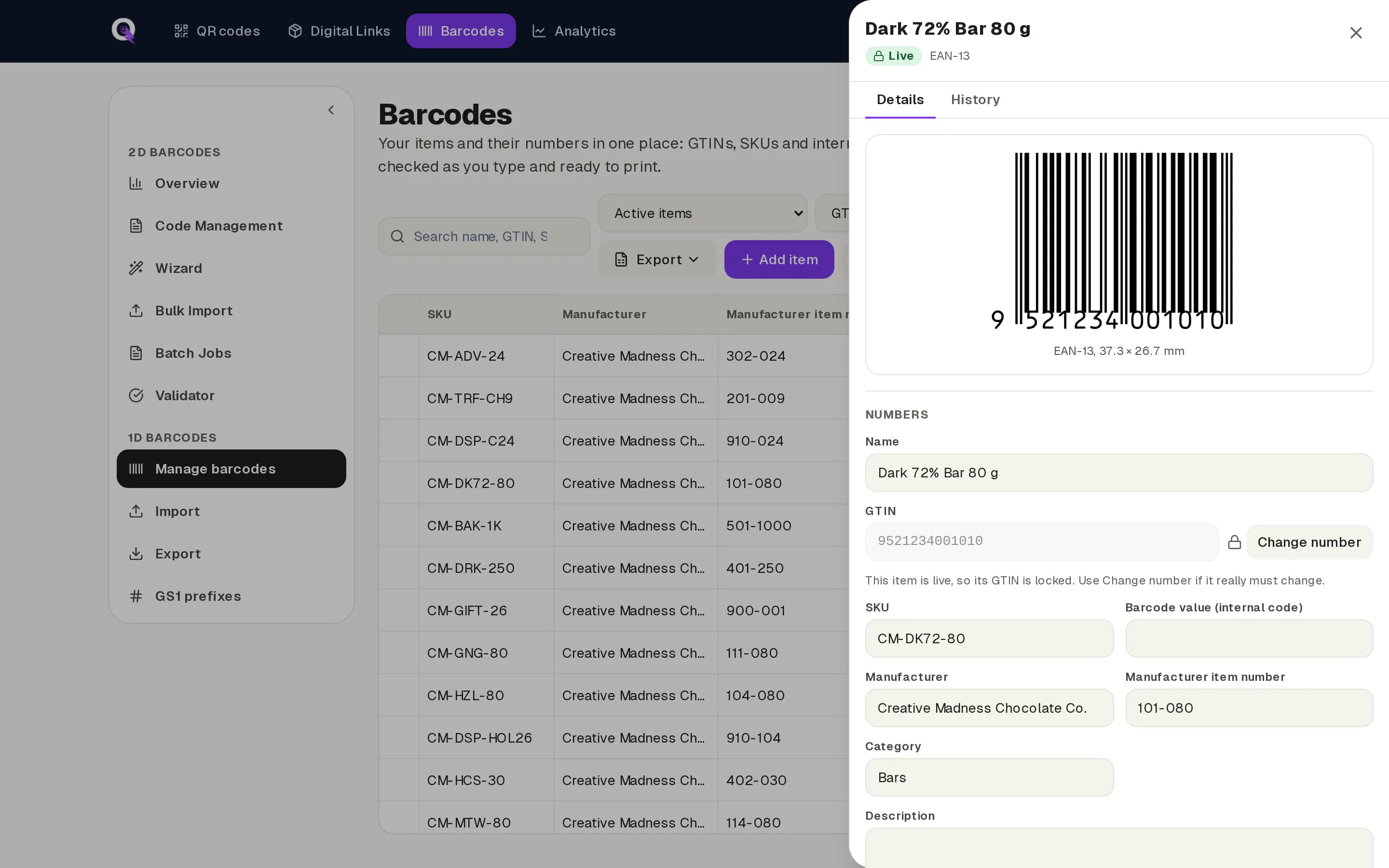
Download a PDF, an SVG, or a PNG at 300 or 600 DPI. Set the size from 80% to 200% of the GS1 standard size, with or without the digits, with quiet zone markers, and with bar width reduction for your printer's process. One click gives the printer a PDF at 100% and the designer an SVG for the artwork.
Batch downloads, label sheets and spec sheets
From Barcodes Starter up, select up to 2,000 items and get one ZIP with a file for each, named by GTIN or SKU and product name. Or print them on A4 label sheets in four common Avery-style layouts or your own grid. A spec sheet PDF lists each item's number, barcode type, size and settings, so the printer can check the proof against it.
Internal codes beside your GTINs
Shelf labels, warehouse locations and in-house SKUs often use Code 128 or Code 39. Keep them in the same list, marked as internal codes and filtered apart from your GTINs. They are for use inside your business, not at the retail till.
One item, three numbers
Each item carries its GTIN, your own SKU and, for goods you buy in, the manufacturer's item number. Search, filter, import and export by any of them, so your barcodes line up with your ERP, your online shop and your suppliers.
Every change on record
Downloading the artwork marks an item Live and locks its GTIN, because it may already be printed. Discontinue a product instead of deleting it: its number stays reserved and is never handed out again. Every change, who made it and when, goes into QRbolt's audit trail.
Your team and your designer
Barcodes Pro includes up to three team users and Barcodes Business up to ten. Give your packaging designer read-only access: they find the products they work on and download the files themselves, but cannot change a number.
1D today, 2D when you are ready
GS1 Sunrise 2027 is the retail industry's target for checkout scanners to be able to read 2D barcodes, such as a QR code with GS1 Digital Link, by the end of 2027. It is a voluntary readiness target, not a deadline to remove 1D. Through the transition most packs carry both codes side by side, which is called dual marking or dual labelling.
Barcode Manager is built for that. Every item is the same product record QRbolt's GS1 Digital Link features use. On a Retail 2D plan you turn on 2D for one item or many, and each gets a GS1 Digital Link QR code with the GTIN it already has. Nothing to re-enter, nothing to renumber.
Then download the dual label: the 1D barcode and the QR code side by side at matching sizes, with the GTIN printed once. Both codes come from one record, so they cannot disagree.
What Barcode Manager is not
Better you hear it here than after you sign up.
Not a GS1 registry
QRbolt does not issue GTINs or GS1 Company Prefixes. You license those from your local GS1 member organisation. QRbolt cannot confirm that a prefix is yours, so the prefix you declare drives warnings, not blocks.
Not a label printer driver or design tool
It makes files and label sheets. It does not drive thermal printers or lay out your packaging.
Not inventory or ERP
No stock levels, prices or orders. It holds your numbers and makes your barcodes.
Not public
A product with only a 1D barcode is visible to your account alone. Its GTIN is claimed across QRbolt only when you turn on 2D.
Plans
Start free with up to 10 items. Each paid plan adds room for more items, and batch files come with all of them. Pro and Business add your team. Every Retail 2D plan includes Barcode Manager too.
Only products and internal codes count towards your items. Packs and cases (GTIN-14 and ITF-14) do not, so a product sold as a unit, a pack of 6 and a case of 24 uses one item, not three.
Barcodes Free
Free
For your first products.
- Up to 10 items
- GTIN assignment from your prefix
- PDF, SVG and PNG files, one at a time
- Import from Excel or CSV
- 1 user
- Up to 100 items
- Batch downloads as one ZIP
- A4 label sheets and spec sheets
- Everything in Barcodes Free
- Up to 1,000 items
- Up to 3 team users, with read-only access for designers
- Everything in Barcodes Starter
- Up to 10,000 items
- Up to 10 team users
- Everything in Barcodes Pro
- More than 10,000 items
- A quote and terms that fit your catalogue
- Everything in Barcodes Business
Retail 2D plans
Barcode Manager included1D barcodes and GS1 Digital Link QR codes for the same products.
- 25 items on Retail 2D Free
- 250 items on Retail 2D Starter, 1,000 on Growth
- Batch downloads and label sheets on Retail 2D Starter and Growth
- Turn on 2D for any item and download dual labels
Which plan fits your GS1 licence?
The plans follow the sizes GS1 licenses numbers in. In the US and Canada a GS1 Company Prefix comes with a set number of GTINs, so as a guide:
- 10 numbers, or a few single GTINs: Barcodes Free
- 100 numbers: Barcodes Starter
- 1,000 numbers: Barcodes Pro
- 10,000 numbers: Barcodes Business
- More than 10,000: Barcodes Enterprise
In countries where GS1 sets its fee by company revenue instead, count the products you sell. Either way, leave room for any internal codes you keep, because they count as items too.
Questions people ask
What is barcode management software?
Barcode management software keeps a business's barcode numbers in one place and makes the barcodes from them. Barcode Manager stores each product's GTIN, SKU and internal codes, checks every number, assigns new GTINs from your GS1 prefix and produces print-ready files. It replaces the spreadsheet most small brands use.
How do I assign a GTIN from my GS1 Company Prefix?
Declare your prefix in Barcode Manager once. Then select a product and choose Assign GTIN. QRbolt takes the lowest number in your prefix that no item uses and that was never retired, adds the check digit, and shows how many numbers are left. It works for many products at once, too.
Can I import my barcodes from a spreadsheet?
Yes. Paste rows from Excel or Google Sheets, or upload an .xlsx or .csv file. Barcode Manager reads names, GTINs, SKUs and manufacturer item numbers, checks every row and shows the problems before anything is saved. A row that matches an existing item by SKU, GTIN or manufacturer item number updates it instead of creating a duplicate.
What barcode file should I send my printer?
Usually a vector file at 100% size with the digits under the bars. Barcode Manager's printer preset gives you that: a PDF at 100% with digits and quiet zone markers. Designers often prefer an SVG to place in the artwork. Ask your printer whether they need bar width reduction, and always scan a printed proof.
What size should an EAN-13 or UPC-A barcode be?
At 100% an EAN-13 or UPC-A is about 37.3 mm wide and 25.9 mm tall. GS1 allows 80% to 200% of that for retail, and Barcode Manager lets you set any size in that range.
How do I make an ITF-14 case code from a unit GTIN?
Put an indicator digit from 1 to 8 in front of the unit's number, drop its old check digit and calculate a new one. That gives the GTIN-14 for the case, printed as an ITF-14 on the carton. In Barcode Manager you add a case to the product and it proposes a free case number for you.
Can I make Code 128 barcodes for internal use?
Yes. Internal codes such as shelf labels, warehouse locations and in-house SKUs can use Code 128 or Code 39. They sit in the same list as your GTINs, filtered apart. Do not put them on products sold in retail stores: the till expects a GTIN.
Do I still need a 1D barcode with GS1 Sunrise 2027?
Yes. Sunrise 2027 is a target for retail scanners to be able to read 2D barcodes, not a deadline to remove 1D. Through the transition most products carry both. Barcode Manager makes both from one product record, so they always share the GTIN.
Can I move a product to 2D later without renumbering?
Yes. On a Retail 2D plan you turn on 2D for an item and it gets a GS1 Digital Link QR code with the GTIN it already has. Nothing is re-entered. The 1D barcode stays available, and you can download both together as one dual label.
Does QRbolt give me GTINs or a GS1 prefix?
No. GTINs come from a GS1 Company Prefix, or a single GTIN, that you license from your local GS1 member organisation. Barcode Manager assigns numbers from the prefix you declare. It checks that each number is well formed and inside your prefix, but it cannot confirm that the prefix is yours.
What happens to the GTIN when a product is discontinued?
It stays reserved. You discontinue the product instead of deleting it, and it stops counting towards your plan. Its GTIN is never assigned to another product, and QRbolt warns if someone types it onto a different item, because GS1 rules restrict reusing a GTIN.
Do packs and cases count towards my item limit?
No. Only products and internal codes count. The packs and cases you add to a product, with their GTIN-14 and ITF-14, do not use up items, so a product with a pack of 6 and a case of 24 counts once. Discontinued items stop counting too.
Which Barcodes plan should I choose?
Start from your GS1 licence. In the US and Canada GS1 licenses a set number of GTINs, and the plans follow those sizes: 10 numbers fit Barcodes Free, 100 fit Starter, 1,000 fit Pro and 10,000 fit Business. For more than 10,000, contact us about Enterprise. Where GS1 charges by company revenue, count the products and internal codes you plan to keep. Every Retail 2D plan includes Barcode Manager as well.
How is it different from the free barcode generator?
The free generator makes one barcode at a time in your browser, with no account. Barcode Manager remembers your products, assigns GTINs from your prefix, handles packs and cases, and keeps a history of every change. From Barcodes Starter up it also makes a whole batch of files at once.
Bring your spreadsheet. Leave with clean barcodes.
Start on Barcodes Free with up to 10 items. Import what you have, fix what is wrong, and download your first print-ready files today.